Animating a photo for TikTok, honestly
What actually changes when the destination is TikTok rather than a camera roll. The vertical crop decided before you generate, five seconds against the platform's pace, and where the AI label actually lives when you post.
TikTok did not invent the five second animated photo, but it is the platform where the most people go looking for one. Most of what ranks for that search is generic advice written for video in general: shoot vertical, keep it short, add a hook. None of it is wrong, and none of it accounts for the one thing that is actually different about a photo animation, which is that the shape and length of the result are locked in before you ever open TikTok.
The frame is decided before you press generate
The app does not reformat your clip for TikTok afterward. It generates the clip at the same aspect ratio as the photograph you feed it, so a landscape photo taken with a phone held sideways comes back as a landscape clip, and TikTok will crop into that on its own terms when it forces it into a vertical feed. The result is usually a face pushed to one edge or a body cut off at the knees, not because the action did anything wrong, but because the shape decision was made once, by the platform, after the shape decision had already been made once by you.
The fix is the same one that applies to any vertical platform: crop the still photograph to something close to 9:16 before you generate anything. Do it there and the clip that comes back already fills a phone screen the way the format expects. Do it after and you are trusting TikTok’s own crop to find the right part of a frame the model has already built around a different shape, which tends to go worse the more the subject moves inside that frame.
This matters more here than it would for a still image post, because a badly framed photo is a quick scroll past and a badly framed five second loop is five seconds of the same mistake repeating.
Five seconds against the platform’s own pace
TikTok’s native pacing is built around cuts, not stillness. A single five second clip, posted alone, reads as a fragment, one beat from something that never arrives. That is not a flaw in the format, it is just what happens when a purpose-built loop meets a feed trained on faster cutting.
The workaround is not to ask the app for something longer than it makes. Every action produces roughly the same length clip regardless of what you ask for, so fighting that is wasted effort. The better move is to generate two or three clips from two or three different photos and cut them together as a short sequence, one setup per shot, the way a real TikTok edit already works. A five second loop that repeats once inside a longer cut about a birthday, a trip, or a reunion reads as a beat in something larger. The same clip posted alone and stretched to fill fifteen seconds by looping it five times reads exactly like what it is.
If the video in your head has a voiceover landing on a specific word or a caption timed to a punchline, a generated clip is the wrong tool for that part of the edit. It does not take direction mid-shot, so build the timing around footage you actually control and let the animated photo be one shot inside it, not the whole thing.
What the dance actions actually need from the photo
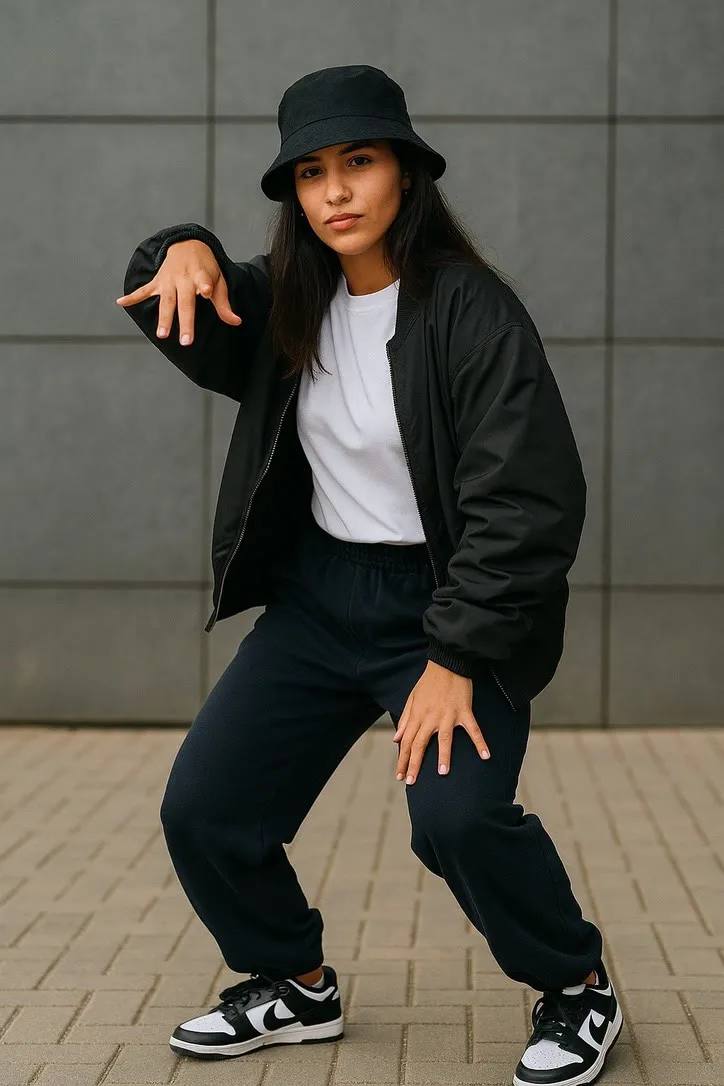
TikTok’s association with dance trends makes Hip Hop, Breakdance and Glow Stick Dance the three actions people reach for first, and they are also the three with the strictest requirement in the whole library: the photograph needs the entire body in frame, feet included, with a little floor visible underneath. A photo cropped at the waist gives the model nothing to move for the lower half of the body, and the result is not a worse dance clip, it is a clip that cannot do the thing it was asked to do.
Loose clothing holds up better than a tight silhouette once the body starts turning, and a plain floor is worth more than an interesting one, because a patterned rug or a busy tile floor has to be reconstructed frame by frame as the person moves across it, and detailed backgrounds are exactly what tends to smear in a generated clip. Glow Stick Dance adds one more condition worth planning for: it is built around a dark setting with points of light, so a photo shot in daylight is fighting the action’s own premise before the model does anything at all.
Where the label actually goes
TikTok has been tightening its handling of AI generated video for a while, and by now it does two things with a clip like this: it frequently detects and labels AI generated content on its own, and it gives you a manual toggle for AI generated content in the posting flow, separate from that detection. Turning it on yourself before the platform decides for you takes a few seconds and reads as someone who was never trying to pass a generated clip off as footage in the first place.
This is worth doing on a birthday clip or a reunion cut just as much as anything else. Nobody needs the illusion protected. A short, honest caption that says the clip is animated costs nothing next to a viewer working it out and wondering why it was not mentioned.
The honest limit
The model is building the clip from a single still frame, not filming anything, so what comes back is an illustration of the movement rather than a recording of it. That is easy to forget when a well cropped loop looks convincing at TikTok’s resolution, and worth remembering before a caption implies otherwise.
Before you post
- Crop the source photo close to 9:16, not the finished clip.
- For a dance action, check the whole body and some floor are actually in the frame.
- Generate two or three short clips instead of one and edit them into a sequence.
- Turn on TikTok’s AI content toggle when you post.
For the same questions applied to Instagram instead, see animating a photo for Instagram Reels. And for a background that gets replaced outright rather than needing to survive a crop, the landmark selfie actions work by a different set of rules entirely.
Common questions
- What aspect ratio should my photo be for TikTok?
- Close to 9:16, the same shape TikTok's own feed is built for. The app generates the clip at whatever shape your source photo already is, so the crop decision has to happen before you generate, not after.
- Is five seconds too short for TikTok?
- On its own, a five second clip is a moment rather than a video. Two or three of them cut together, one per photo, reads as a sequence rather than a single short attempt at something the format was not built for.
- Do I need to label an animated photo as AI on TikTok?
- TikTok already runs automatic detection on AI generated video and will often label it whether you do or not. There is also a manual toggle for AI generated content in the posting settings, and using it yourself is simpler than waiting to be flagged.
- Which actions actually suit a TikTok dance clip?
- Hip Hop and Breakdance are built for exactly this, provided the source photo shows the whole body with floor underneath. Glow Stick Dance works the same way in a dark setting. None of the three will do anything useful with a head and shoulders crop.