The best app to animate a photo on an iPhone, and how to judge one
We publish this site and we make one of the apps, so here is the disclosure first and the criteria second. Five things that genuinely separate apps in this category, the honest case for AI Video, and the situations where it is the wrong choice.
There is no single best app here, and we are not a neutral party: MomentumLab AI publishes this site and makes AI Video. What separates apps in this category is the catalogue, whether the result is a clip or a restyled still, how the app charges, and what it says about your uploaded photograph. Those criteria hold whichever app you choose.
The disclosure, first
Almost every page ranking for this query is a list written by someone with an affiliate relationship to the apps on it, ordered by commission. This page is worse in one respect and better in another: we make one of the apps, and we are telling you so before the argument rather than in small type underneath it.
What we can do in place of neutrality is give you the criteria, apply them to our own app honestly including where it loses, and keep to the rules this site runs on. No star ratings, no success rates, no user counts, because we do not have honest versions of those. No prices, because the App Store is the only place that can state one in your currency and be right next month. The about page prints the whole standard.
The five things that actually differ
Start here, because most comparison pages compare things that are identical across the category.
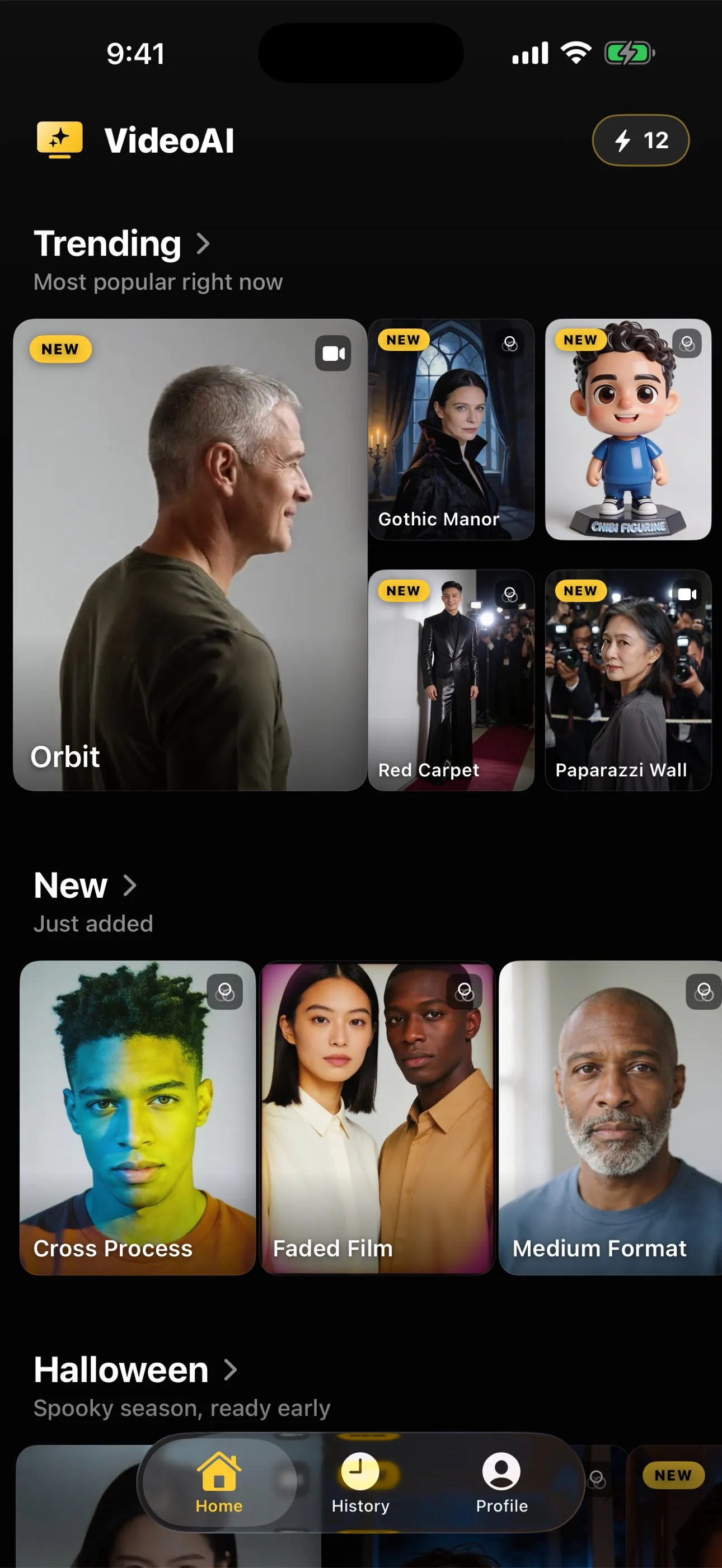
One: what the catalogue covers. Some apps do one gesture well. Others carry a broad library across dance, sport, travel, everyday moments, film looks and figurine styles. Neither is better in the abstract. A single-purpose app is often cleaner if the one thing it does is the thing you want, and a broad catalogue matters when you do not yet know which action your photograph can carry. You can judge this before installing, since a serious app lists what it has.
Two: clips, stills, or both. These are different jobs, not two settings of one job. A motion action invents movement and returns about five seconds of video. A photo style keeps the pose and returns a new picture. An app that only does one of them is the wrong tool for the other half of what people want. Animating a photo versus restyling it explains the split.
Three: how it charges. Per generation, or per period. A credit pack that does not renew suits someone making one card. A subscription suits someone generating weekly and is waste for everyone else. The thing worth checking before installing is whether a one-off route exists at all, because plenty of apps in this category have removed it. Making an AI video without a subscription covers that decision.
Four: what it says about your photograph. Every app here uploads your image, because the models cannot run on a phone. What differs is whether the app says so plainly, what it says the image is used for, and what its App Store label declares beyond the image. Are your photos private in an AI video app sets out what to read and in what order.
Five: whether it documents its own limits. Hands go wrong. Likenesses drift over large movements. Heavy styles pull a face toward their own conventions. All of that is true of every tool in the category, and an app that writes it down somewhere readable is telling you something about how it will treat you when a result disappoints.
The honest case for AI Video
On the criteria above: the catalogue is broad and spans both halves, motion actions and photo styles, across shelves like dance, sports, travel, everyday life, film portraits and figurine styles. Every one of those actions has a page on this site, built from the app’s own catalogue rather than retyped, with the same preview still the app itself ships and a note on what the action expects from your photograph. You can read all of it without installing anything, which is unusual in this category and deliberate.
Charging: free to download, no free tier, credits bought as a one-off pack or refilled by a subscription. The one-off route exists and does not renew.
Photographs: uploaded to the generation service to produce your result, with the app asking for agreement before the first run, and the App Store listing declaring analytics and advertising related collection including identifiers.
Limits: written down, in full, on the same site that sells the app.
Where it is the wrong choice
Three situations, stated plainly.
You want one small gesture on a fragile old portrait, nothing else in the frame disturbed. A face-only tool is a genuinely different mechanism and sometimes the better fit. MyHeritage launched Deep Nostalgia in February 2021 doing exactly that, and what replaced Deep Nostalgia explains why the two categories are not competitors so much as different answers.
You need it to cost nothing. This app costs money past the download, with no free tier to hide behind. Can you animate a photo for free is an honest survey of the routes that genuinely are free and what each of them takes instead of money.
The work belongs on a desktop, in bulk. A phone app is the wrong shape for a large batch of scans, and nothing about this one changes that.
The thing that decides the result, whichever app you pick
This is the part the comparison pages leave out because it sells nothing. The photograph matters more than the app. Front-on and evenly lit beats sharp and dramatic. A crop that already contains what the action has to move beats any amount of retrying. A plain background beats a busy one every time a body moves across it.
Choosing a photo that will animate well is the one-minute version of that check, and it applies identically to every app in this category, including the ones we did not make.
The short version
Judge on catalogue, output type, charging shape, candour about your photograph, and whether limits are documented. AI Video is ours, it is broad, it charges per generation with a one-off route, and its limits are written on this site rather than hidden from it. It is the wrong answer if you want free, if you want a single gentle gesture on a delicate portrait, or if the job belongs on a desktop. And whichever you choose, the picture you feed it decides more than the choice does.
Common questions
- Are you a neutral reviewer of this category?
- No, and the page says so in its first sentence. MomentumLab AI publishes this site and makes AI Video. What we can offer instead of neutrality is a set of criteria that apply to any app in the category, our own app's limits written down in the same place as its case, and no prices, star ratings or success rates anywhere on this site because we do not have honest versions of those.
- What actually separates apps in this category?
- Five things: what the catalogue covers, whether results are clips or restyled stills, how the app charges, what it says about your uploaded photograph, and whether it documents its limits anywhere you can read before installing. Almost nothing else is a real difference, since every app here sends your image to a generation service.
- Is there an app that animates a photo entirely on the iPhone?
- Not for this kind of generation. The models are far too large to run on a handset, so every app in the category uploads. On-device work is genuine for filters and adjustments, which are a different order of computation. Treat a claim of local video generation as something to verify.
- When is AI Video the wrong choice?
- When you want a single small gesture on a fragile old portrait and nothing else in the frame touched, when you need something free, or when the work belongs on a desktop in a batch. Those are real situations and this is not the tool for them.
- Does the app have a free tier?
- No. It is free to download, and there is no trial and no daily allowance of free results. Every generation spends credits, bought as a one-off pack or refilled by a subscription. The figures live on the App Store listing and inside the app, never on this site.