Harsh light, backlight, and a face in shadow: what bad lighting does to an animation
A sharp, well-exposed photo can still animate badly if the light was wrong. The three lighting failures that hide a face from the model, and what an edit can and cannot fix before you generate.
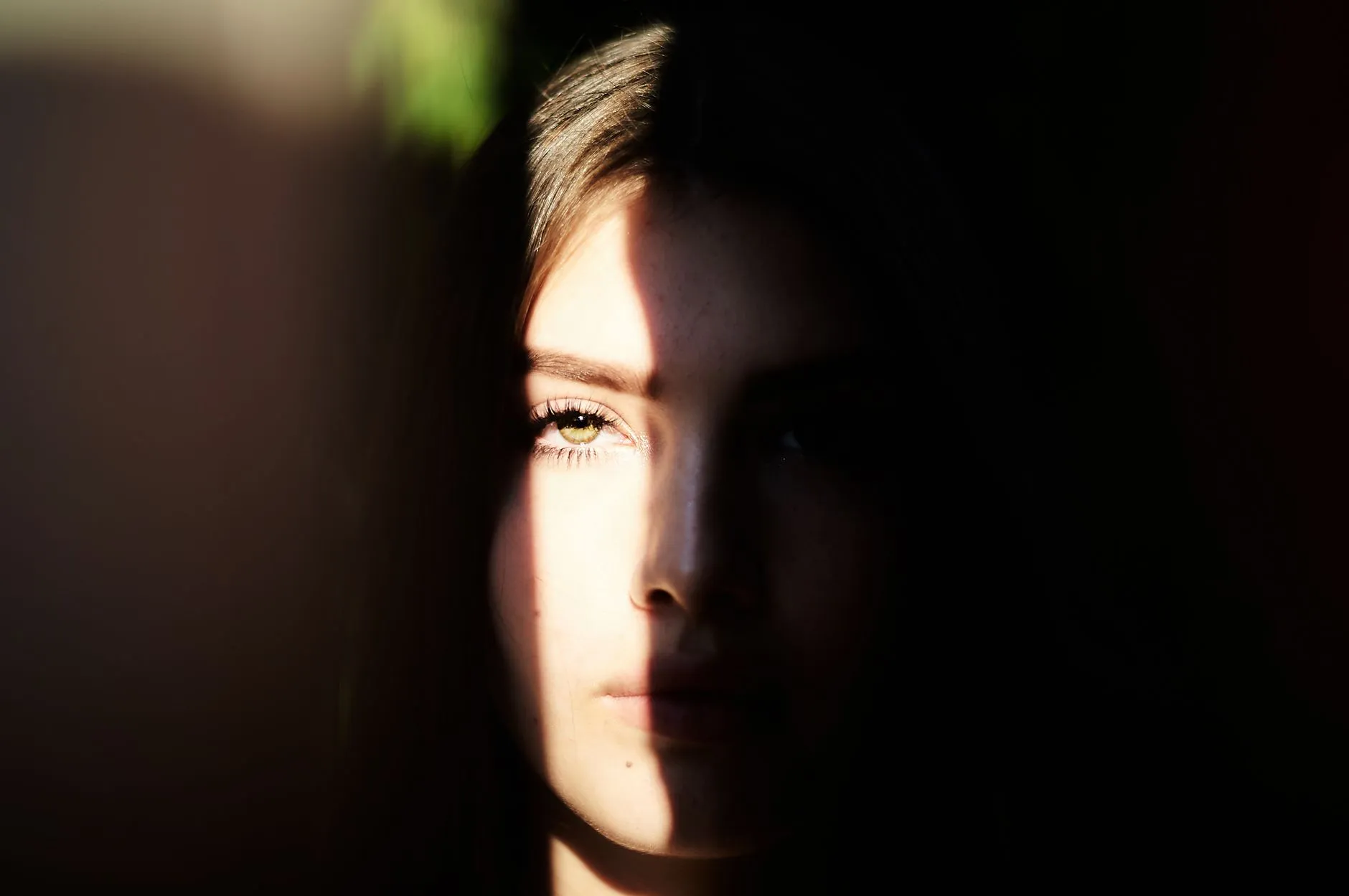
A photo can be sharp, well composed and correctly exposed, and still be a poor photo to animate, for a reason that has nothing to do with any of that. The light on the face decides how much the model can actually read, and hard light, whichever direction it comes from, takes information away in a way that a viewer barely notices and the model cannot work around. This is craft rule three on this site, and it deserves its own page, because “bad lighting” covers three genuinely different problems with three different symptoms.
Overhead light hiding the eyes
Direct light from above, the kind you get at midday with no cloud cover or from a single ceiling light in a room, drops a shadow straight down from the brow and the nose. The eyes, which do most of the work in a readable expression, sit right where that shadow lands. In a still photograph this often looks fine, even flattering, because a viewer fills in an eye they can mostly see the shape of. The model does not fill anything in. It has to build a moving, expressive eye from whatever pixels are actually there, and a shadowed socket with no clear iris or eyelid line gives it very little to work from.
The symptom: an expression that reads as approximately right and subtly off at the same time, as if the face is performing the emotion rather than having it. It shows up hardest on face-led actions like Surprised, which needs the eyes to widen convincingly. Ask that action to build genuine surprise out of eyes it can barely see and the result looks like effort without conviction, because the one part of the face the whole action depends on was the part the light took away.
Backlight turning a person into a silhouette
Strong light behind the subject, a bright window, an open doorway, the sun low and behind someone’s shoulders, does the opposite of overhead light but arrives at the same place. The camera exposes for the bright background, the face goes dark to compensate, and past a certain point the face stops being a face and becomes an outline. A little of this is a mood, a lot of it is a missing input.
The symptom: either a flattened, low-contrast face where the model has had to guess at features it can barely distinguish from the surrounding shadow, or, in the most extreme cases, a clip that keeps the outline of a head and shoulders moving while the features inside it never quite resolve into anyone in particular. This is the travel and outdoor photo version of the problem specifically. A Scenery Selfie taken with the sun over your shoulder and the view lit beautifully in front of you is often the exact photo where the person, the actual subject of the clip, has gone dark against their own spectacular background.
One side of the face lost entirely
The third failure is directional rather than overhead or behind: light coming hard from one side, common with a single window, a lamp, or the low sun at an angle. Half the face is lit, often lit well, and the other half falls into a shadow deep enough to lose the eye, the cheek and sometimes half the mouth. It is a favourite look in portrait photography for exactly this reason, and it is one of the least forgiving inputs this app sees, because the model is being asked to animate a face it can only see one half of.
The symptom: an expression, or the whole face, that seems to shift or drift on the shadowed side as the clip runs, because the model is continuously reconstructing a side of the face it never had clear information about to begin with, and small differences show up between frames. A face lit hard from one side and a face turned three-quarters away from the camera fail for related reasons: in both cases, roughly half the face is not really available to work from, one because of angle and one because of light.
Why soft, even light beats resolution every time
None of the three failures above is a resolution problem, which is what makes them easy to miss. A phone photo taken in flat, overcast daylight, at ordinary resolution, gives the model a face it can actually read: two eyes with visible shape, skin tone that reads consistently across the whole face, no side lost to shadow. A far sharper, higher resolution photo shot in directional light hands the model less real information about the face, even though it looks like more information to a person glancing at it. Light decides how much of the face is legible. Resolution only decides how crisp the legible part looks.
What an edit can fix, and what it cannot
This is worth separating clearly, because it decides whether reaching for an editing app before you animate is worth the time. Lifting shadows and pulling down highlights in an ordinary photo editor recovers detail that the camera captured but stored dark or bright in the file. If you can just make out the shape of an eye in a shadowed side of the face, brightening that area genuinely helps, because the information was there, just hard to see.
What an edit cannot do is invent detail the camera never captured. A shadow that has crushed to pure black, with no texture or shape left in it at all, has nothing in it to recover, and pushing the brightness up on that area just produces a flat grey patch where a shadow used to be, not a face. The same is true of a background blown out to pure white behind a backlit subject. If the file itself has nothing left in the dark or bright area, no amount of editing puts it back. That distinction, information that is dim against information that is gone, is the whole question before you spend time editing a photo instead of simply retaking or choosing a different one. Where the underlying issue is closer to genuine damage than to exposure, a fade, a colour cast, a scan of an old print, restoring the photo first is the more direct fix than adjusting levels in a general photo editor.
Said plainly
The model is generating a plausible few seconds of movement from a single still frame, and it can only work with the face it can actually see in that frame. Hard overhead light, strong backlight and hard side light each take away a different part of that face, and no amount of sharpness or resolution buys it back. The reliable fix, more often than editing, is retaking the photo in flat, even light, a bright window with no direct sun through it or an overcast day both do this without any equipment at all. The rest of what makes a photograph a good starting point, crop, occlusion, and the angle of the face itself, is in choosing a photo that will animate well, which covers light alongside the other checks worth running before your first generation.
Common questions
- Why does a photo with harsh light animate badly even when it is sharp and well exposed?
- Because the model is not grading the photo on sharpness or exposure, it is trying to read the shape and expression of a face well enough to move it. Hard light removes exactly the information it needs, whichever side of the face it falls on, and a technically excellent photo taken in the wrong light can lose more of that information than a soft, ordinary snapshot taken in even light.
- Can you animate a backlit photo, like someone standing in front of a bright window?
- It depends on how far the face has gone toward silhouette. A little backlight that softens the face is fine. A photo where the face has lost its features to a dark, even shape is close to a blank input for anything built around expression, because there is no face left for the model to read, only an outline.
- Can editing fix a photo that was shot in hard light before you animate it?
- Partly. Lifting shadows and pulling down highlights in a normal photo editor can recover real detail that was captured but sits dark or bright in the file, and that is worth doing before you animate. It cannot invent detail that the camera never captured in the first place, which is the difference between a shadow that is dark and a shadow that is pure black with nothing in it.
- What kind of light actually works best for animating a face?
- Soft and even, hitting the face from roughly the direction of the camera. Overcast daylight, a bright window with no direct sun coming through it, or open shade all produce this without any equipment. It is a plainer looking photo than one shot in dramatic light, and it is consistently the one that animates best.